- Log into your Panopto library
- Along the top bar, click Create>New Folder
- Name the folder whatever you like and make sure the Parent folder is set to My Folder
- Click Create Folder
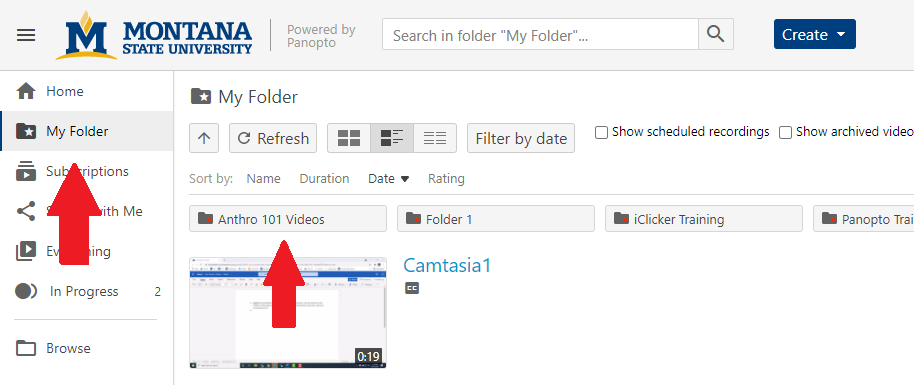
- On the left sidebar, click My Folder and then click on your newly created folder, which will be along the top of your
video library.
- In the upper right hand corner, click the connected dots icon to open the share settings

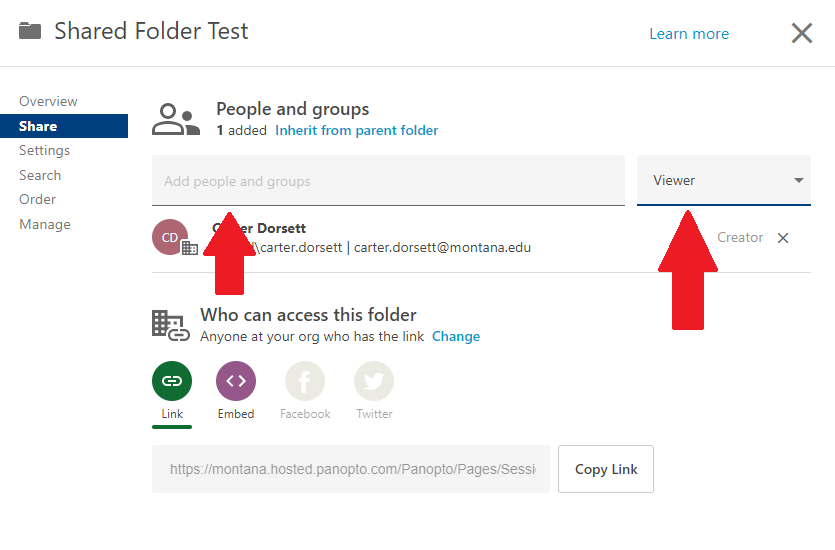
- In the Add people and groups bar, type in the names of who you would like to share the folder with and change
the dropdown menu next to it from Viewer to Creator
- Click Send
Academic Technology
Montana State University
P.O. Box 173860
Location: 128 Barnard Hall
Bozeman, MT 59717-3860
Contact Us
Assistant Director:
Carter Dorsett